
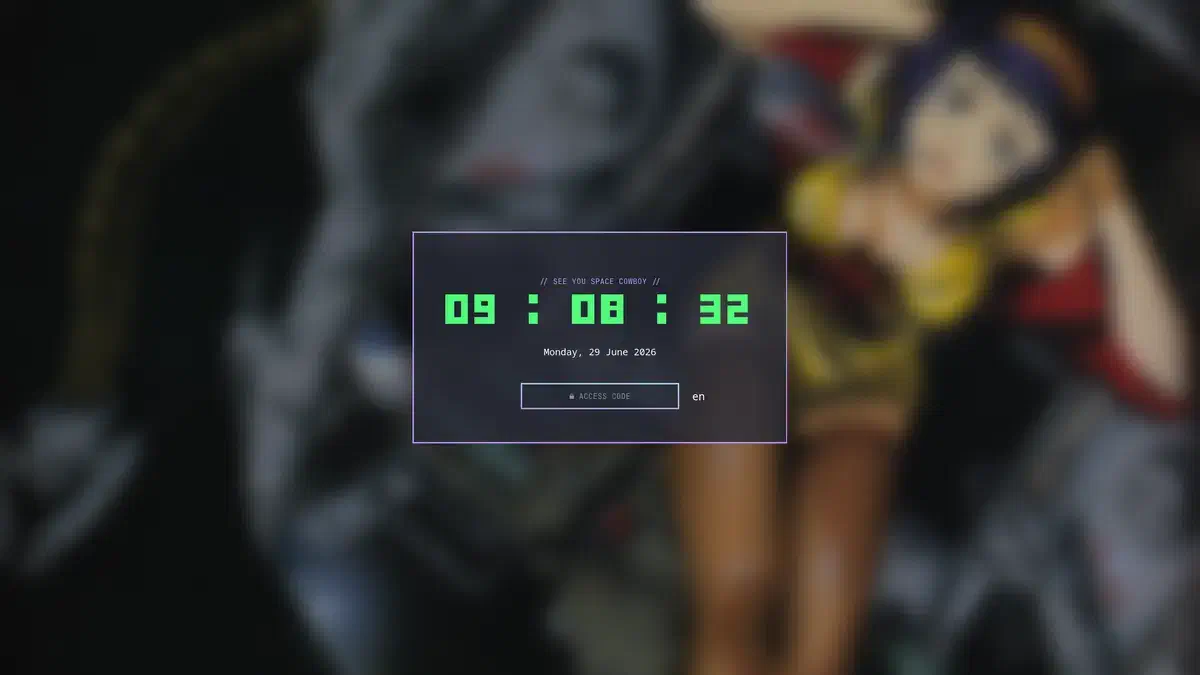

Introducción#
Hyprlock no tiene una integración directa con awww para saber qué wallpaper está activo.
Aunque awww es el encargado de mostrar el fondo de pantalla, Hyprlock funciona de forma independiente y solo puede cargar una imagen si se le indica una ruta.
Para solucionar esto se usa un pequeño script que crea un enlace simbólico (symlink) al wallpaper actual y luego inicia Hyprlock usando ese enlace.
El flujo queda así:
- Waypaper selecciona el wallpaper.
- awww muestra el wallpaper en el escritorio.
- El script consulta awww para obtener la imagen actual.
- El script crea un enlace llamado
current. - Hyprlock carga siempre ese enlace.
Esquema mental de como funciona:#
waypaper
    ↓
awww-daemon
    ↓
awww query
    ↓
~/.config/hypr/wallpaper/current
    ↓
hyprlock
Script de bloqueo#
El script se puede guardar, por ejemplo, en:
~/.local/bin/hlockContenido#
#!/usr/bin/env bash

WALL=$(awww query | sed -n 's/.*image: //p')

ln -sf "$WALL" ~/.config/hypr/wallpaper/current

hyprlock
Como Funciona:#
WALL=$(awww query | sed -n 's/.*image: //p')- awww query consulta al daemon de wallpapers qué imagen está usando actualmente.
Ejemplo de salida:
: DP-2: 2560x1440, scale: 1, currently displaying: image: /home/graplo/Imágenes/wallpapers/wallpaper.png- sed filtra esa salida y extrae solamente la ruta del archivo.
El resultado guardado en la variable WALL será:
/home/graplo/Imágenes/wallpapers/wallpaper.pngCrear el enlace simbólico#
ln -sf "$WALL" ~/.config/hypr/wallpaper/currentCrea un enlace llamado:
~/.config/hypr/wallpaper/currentque apunta al wallpaper real.
Ejemplo:
current → /home/graplo/Imágenes/wallpapers/wallpaper.pngLas opciones usadas:
-screa un enlace simbólico.-freemplaza el enlace anterior si ya existe.
Esto permite cambiar de wallpaper sin modificar la configuración de Hyprlock.
Configuración de Hyprlock#
En ~/.config/hypr/hyprland.conf se utiliza el enlace creado por el script:
background {
    monitor =
    path = /home/graplo/.config/hypr/wallpaper/current
    blur_passes = 3
    blur_size = 7
}
Es un ejemplo el path es lo importante
Ventajas de este método:
- El archivo hyprlock.conf nunca cambia.
- Funciona con cualquier wallpaper seleccionado desde waypaper.
- No copia imágenes ni consume espacio extra.
- El cambio del wallpaper es instantáneo porque solo se actualiza un enlace.
- Mantiene separados los componentes:
- awww administra wallpapers.
- waypaper selecciona wallpapers.
- Hyprlock gestiona el bloqueo.
Permisos del script#
Para poder ejecutarlo:
chmod +x ~/.local/bin/hlockLuego se puede lanzar con:#
hlockEjemplo de como lo tengo mi config#
# sample hyprlock.conf
# for more configuration options, refer https://wiki.hyprland.org/Hypr-Ecosystem/hyprlock
#
# rendered text in all widgets supports pango markup (e.g. <b> or <i> tags)
# ref. https://wiki.hyprland.org/Hypr-Ecosystem/hyprlock/#general-remarks
#
# shortcuts to clear password buffer: ESC, Ctrl+U, Ctrl+Backspace
#
# you can get started by copying this config to ~/.config/hypr/hyprlock.conf
#
$font = Monospace
general {
hide_cursor = false
}
# uncomment to enable fingerprint authentication
# auth {
# fingerprint {
# enabled = true
# ready_message = Scan fingerprint to unlock
# present_message = Scanning...
# retry_delay = 250 # in milliseconds
# }
# }
animations {
enabled = true
bezier = linear, 1, 1, 0, 0
animation = fadeIn, 1, 5, linear
animation = fadeOut, 1, 5, linear
animation = inputFieldDots, 1, 2, linear
}
background {
monitor =
path = /home/graplo/.config/hypr/wallpaper/current
blur_passes = 3
blur_size = 5
brightness = 0.7
contrast = 1.2
vibrancy = 0.2
}
input-field {
monitor =
size = 13%, 3.5%
outline_thickness = 3
inner_color = rgba(0, 0, 0, 0.0) # no fill
outer_color = rgba(bd93f9ff) rgba(8be9fdff) 45deg
check_color = rgba(00ff99ee) rgba(ff6633ee) 120deg
fail_color = rgba(ff6633ee) rgba(ff0066ee) 40deg
font_color = rgb(143, 143, 143)
fade_on_empty = false
rounding = 0
font_family = JetBrainsMono Nerd Font Mono
placeholder_text = ACCESS CODE
fail_text = $PAMFAIL
# uncomment if you wish to display a message during authentication
# check_text = Authenticating...
# uncomment to use a letter instead of a dot to indicate the typed password
# dots_text_format = *
# dots_size = 0.4
dots_spacing = 0.3
# uncomment to use an input indicator that does not show the password length (similar to swaylock's input indicator)
# hide_input = true
position = 0, -125
halign = center
valign = center
}
shape {
monitor =
size = 31%, 31%
color = rgba(282a36cc)
rounding = 0
position = 0, 0
halign = center
valign = center
}
# Frase personalizada
label {
monitor =
text = // SEE YOU SPACE COWBOY //
font_size = 15
font_family = JetBrainsMono Nerd Font Mono
position = 0, 120
halign = center
valign = center
color = rgb(bd93f9)
}
# TIME
label {
monitor =
text = cmd[update:1000] date +"%H : %M : %S"
font_size = 90
font_family = Deltarune
color = rgb(50fa7b)
position = 0, 45
halign = center
valign = center
}
# DATE con LC_TIME=C le digo al sistema pon la fecha en ingles
label {
monitor =
text = cmd[update:60000] LC_TIME=C date +"%A, %d %B %Y" # update every 60 seconds
font_size = 15
font_family = $font
position = 0, -15
halign = center
valign = center
}
label {
monitor =
text = $LAYOUT[en,ru]
font_size = 24
onclick = hyprctl switchxkblayout all next
position = 210, -125
halign = center
valign = center
}tip para tomar foto de ello#
sleep 5 && grim ~/lockscreen.pngtienes q tener grim para esto.