
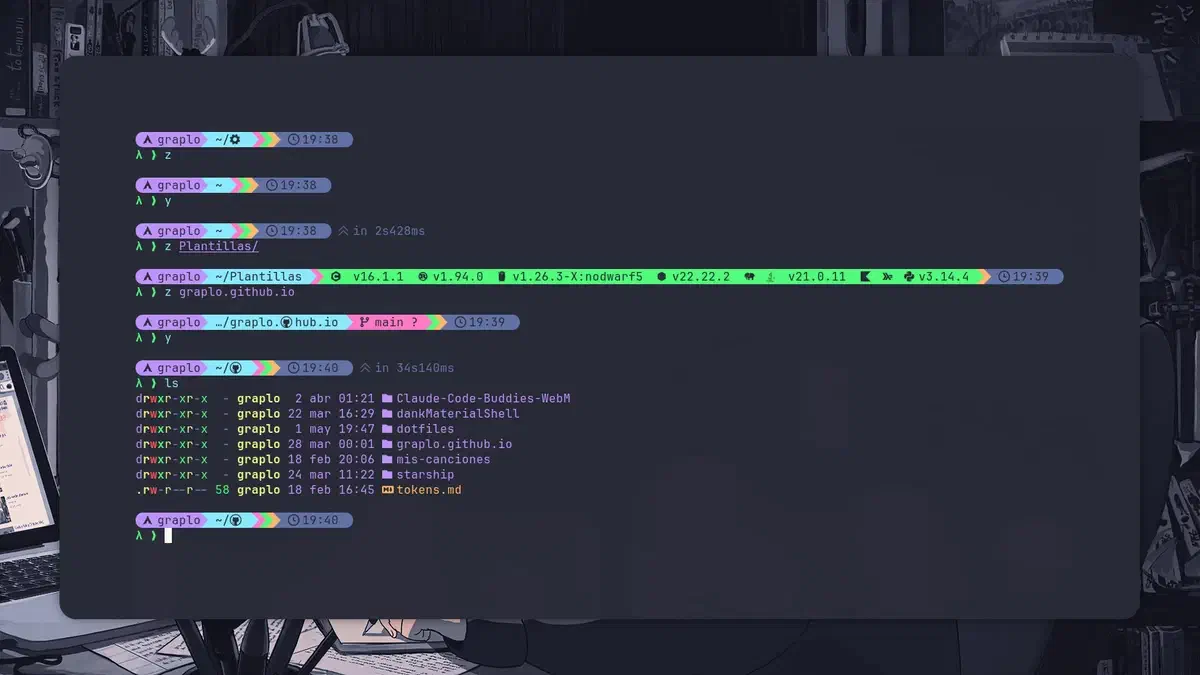

Starship es un prompt de terminal de código abierto escrito en Rust. Destaca por ser rápido, minimalista y compatible con casi cualquier shell — Bash, Zsh, Fish, PowerShell — y cualquier distro. Más información en starship.rs.
Instalación#
Arch Linux / CachyOS:
sudo pacman -S starshipFedora:
sudo dnf copr enable atim/starship
sudo dnf install starship
Ubuntu / Debian:
sudo apt install starshipScript universal (funciona en cualquier distro):
curl -sS https://starship.rs/install.sh | shActivar Starship en tu shell#
Agrega la línea correspondiente al archivo de configuración de tu shell:
Fish (~/.config/fish/config.fish):
starship init fish | sourceBash (~/.bashrc):
eval "$(starship init bash)"Zsh (~/.zshrc):
eval "$(starship init zsh)"Después de agregar la línea recarga la configuración o abre una terminal nueva.
Configuración#
El archivo de configuración vive en ~/.config/starship.toml. Si no existe lo creas:
mkdir -p ~/.config
touch ~/.config/starship.toml
Starship tiene módulos para git, lenguajes de programación, tiempo de ejecución de comandos, uso de memoria y mucho más. Cada módulo se activa automáticamente cuando detecta el contexto — por ejemplo el módulo de Rust aparece solo cuando estás en un directorio con un proyecto Rust.
Mi configuración con tema Dracula#
Basada en Catppuccin y personalizada con la paleta Dracula:
format = """
[](purple)\
$os\
$username\
[](bg:cyan fg:purple)\
$directory\
[](bg:pink fg:cyan)\
$git_branch\
$git_status\
[](fg:pink bg:green)\
$c\
$rust\
$golang\
$nodejs\
$php\
$java\
$kotlin\
$haskell\
$python\
[](fg:green bg:orange)\
$jobs\
[](fg:orange bg:comment)\
$time\
[ ](fg:comment)\
$cmd_duration\
$line_break\
$character"""
palette = 'dracula'
[os]
disabled = false
style = "bg:purple fg:background"
[os.symbols]
Windows = ""
Ubuntu = ""
SUSE = ""
Raspbian = ""
Mint = ""
Macos = ""
Manjaro = ""
Linux = ""
Gentoo = ""
# Fedora = ""
Fedora = ""
Alpine = ""
Amazon = ""
Android = ""
AOSC = ""
Arch = ""
Artix = ""
CentOS = ""
Debian = ""
Redhat = ""
RedHatEnterprise = ""
CachyOS = ""
[username]
show_always = true
style_user = "bg:purple fg:background"
style_root = "bg:red fg:foreground"
format = '[ $user]($style)'
[directory]
style = "bg:cyan fg:background"
format = "[ $path ]($style)"
truncation_length = 3
truncation_symbol = "…/"
[directory.substitutions]
"Documents" = " "
"Documentos" = " "
"Downloads" = " "
"Descargas" = " "
"Music" = " "
"Música" = " "
"Pictures" = " "
"Imágenes" = " "
"Developer" = " "
"git" = " "
".config" = " "
[git_branch]
symbol = ""
style = "bg:pink"
format = '[[ $symbol $branch ](fg:background bg:pink)]($style)'
[git_status]
style = "bg:pink"
format = '[[($all_status$ahead_behind )](fg:background bg:pink)]($style)'
# Lenguajes — bloque técnico unificado
[nodejs]
symbol = ""
style = "bg:green"
format = '[[ $symbol( $version) ](fg:background bg:green)]($style)'
[c]
symbol = " "
style = "bg:green"
format = '[[ $symbol( $version) ](fg:background bg:green)]($style)'
[rust]
symbol = ""
style = "bg:green"
format = '[[ $symbol( $version) ](fg:background bg:green)]($style)'
[golang]
symbol = ""
style = "bg:green"
format = '[[ $symbol( $version) ](fg:background bg:green)]($style)'
[php]
symbol = ""
style = "bg:green"
format = '[[ $symbol( $version) ](fg:background bg:green)]($style)'
[java]
symbol = " "
style = "bg:green"
format = '[[ $symbol( $version) ](fg:background bg:green)]($style)'
[kotlin]
symbol = ""
style = "bg:green"
format = '[[ $symbol( $version) ](fg:background bg:green)]($style)'
[haskell]
symbol = ""
style = "bg:green"
format = '[[ $symbol( $version) ](fg:background bg:green)]($style)'
[python]
symbol = ""
style = "bg:green"
format = '[[ $symbol( $version)(\(#$virtualenv\)) ](fg:background bg:green)]($style)'
# [conda]
# symbol = " "
# style = "fg:background bg:red"
# format = '[$symbol$environment ]($style)'
# ignore_base = false
[jobs]
symbol = " "
style = "fg:background bg:orange"
format = '[[ $symbol$number jobs ](fg:background bg:orange)]($style)'
threshold = 1
number_threshold = 1
[time]
disabled = false
time_format = "%R"
style = "bg:comment"
format = '[[ $time ](fg:background bg:comment)]($style)'
[cmd_duration]
show_milliseconds = true
format = "[ in $duration ]($style)"
style = "fg:comment"
disabled = false
show_notifications = false
min_time_to_notify = 45000
[line_break]
disabled = false
[character]
disabled = false
success_symbol = '[λ ❯](bold fg:green)'
error_symbol = '[λ ❯](bold fg:red)'
vimcmd_symbol = '[λ ❮](bold fg:green)'
vimcmd_replace_one_symbol = '[λ ❮](bold fg:purple)'
vimcmd_replace_symbol = '[λ ❮](bold fg:purple)'
vimcmd_visual_symbol = '[λ ❮](bold fg:yellow)'
[palettes.dracula]
# Colores de fondo
background = "#282a36"
current_line = "#44475a"
selection = "#44475a"
# Colores de texto
foreground = "#f8f8f2"
comment = "#6272a4"
# Colores principales (los más usados)
cyan = "#8be9fd"
green = "#50fa7b"
orange = "#ffb86c"
pink = "#ff79c6"
purple = "#bd93f9"
red = "#ff5555"
yellow = "#f1fa8c"
# Extras útiles
white = "#f8f8f2"
gray = "#6272a4"
dark_gray = "#44475a"
black = "#282a36"
# Para transparencia/overlays
overlay0 = "#44475a"
overlay1 = "#6272a4"
overlay2 = "#8be9fd"Nota: Bug en el preset oficial de Dracula#
Si descargas el preset oficial de Dracula para Starship con:
starship preset dracula -o ~/.config/starship.tomlEl módulo cmd_duration tiene un bug conocido donde $style no se aplica correctamente y el tiempo de ejecución de comandos aparece sin color.
El módulo afectado luce así en el preset oficial:
[cmd_duration]
format = "[ in $duration ]($style)"
style = "fg:comment"
El problema es que $style no toma el color definido. Para corregirlo asegúrate de que el formato y el estilo estén correctamente referenciados — puedes verificarlo comparando con otro preset funcional como Catppuccin y ajustando manualmente los colores de tu paleta Dracula.
Este bug fue reportado a la comunidad — si al momento de leer esto ya está corregido en el preset oficial, puedes ignorar esta nota.